
The Vavada app is a web app (PWA): you open the site in Chrome or Safari and add it to the home screen. Neither Google Play nor the App Store lists a Vavada app; the footer links "App for iOS" and "App for Android" lead to installing that web app. APK files from other sites put your account details at risk. Where vavada.com shows error 451, no new account and no new installation is possible.
Key facts checked 17 October 2026
- Type of app
- PWA, web app in the browser
- Google Play
- No app
- Apple App Store
- No app
- Android install
- Chrome, menu, home screen
- iPhone install
- Safari, Share, Add to Home Screen
- PL and DE visitors (17 Oct 2026)
- Error 451
Status on 17 October 2026: The app does not get round the country block: from Poland and Germany vavada.com answered with error 451 on 17 October 2026, leaving only the log-in for existing accounts. India is not named in that list, but we have not checked access from there or from Ireland and Canada. The simple test is to open the site: if you see error 451, registration is closed where you are, and the Vavada app has little to offer you.
What the Vavada app really is
Most people who search for the Vavada app expect a file in an app store. There is none. Vavada relies on a web app, known as a PWA (progressive web app). It is the normal website behaving like an app: its own icon on the home screen, a launch without an address bar, quick access.
Searches for a "Vavada casino app" therefore lead to the same web app, not to a separate download.
The footer of vavada.com does contain the links "App for iOS" and "App for Android". They lead to installing the web app, not to a store. Neither Google Play nor the Apple App Store lists a Vavada app.
A PWA has an advantage: updates happen on the site itself, so you download nothing new. The drawback is that nothing works offline, and some phone features, push notifications for instance, are limited on certain devices.
Vavada app for Android
The steps below are for Chrome. Other browsers name the menu items slightly differently.
- Open the casino's address in Chrome and sign in with your existing account.
- Tap the three dots at the top right.
- Choose "Install app" or "Add to Home screen".
- Confirm the prompt. The icon then appears among your apps.
You recognise the real site by the address in the browser and the padlock in front of it. If someone sends you an "official APK", you do not need it: installing through the browser is enough. People who search for the Vavada app download on Android are really looking for these four steps.
Vavada app for iPhone and iPad
On an iPhone the installation works only through Safari.
- Open the site in Safari and sign in.
- Tap the Share icon at the bottom, the square with an arrow.
- Scroll the list and choose "Add to Home Screen".
- Confirm with "Add".
The icon then sits on the home screen. The web app opens full-screen and behaves like an ordinary app.
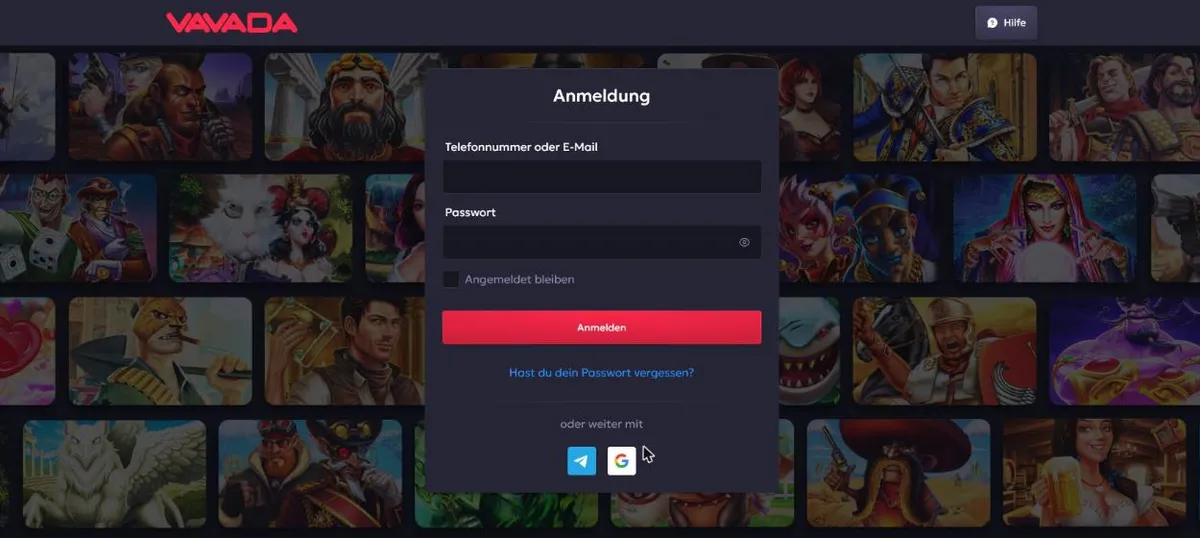
The sign-in form, shown here in its German-language version, offers email or phone number with a password, plus Telegram and Google. You see the same form in the web app. If you have forgotten your password, Vavada login shows what to do.
Can't get into your account? The recommended casino opens straight away, no address hunting.
The vavada apk problem
On the internet you will find files with names such as "Vavada.apk". They do not come from a store or from a source you can check. Anyone who installs one gives the file far-reaching rights on the phone.
Typical dangers:
- The file asks for access to SMS, contacts or accessibility services, and uses them to read your confirmation codes.
- It shows a sign-in window that looks like Vavada and sends your username and password to third parties.
- It installs further programs without your noticing.
Fake Vavada clones also exist. The real support never asks for your password, and you do not need a Vavada app file for the account at all. If you have already installed an APK, uninstall it, change your password and, where possible, switch on code confirmation.
How to spot a fake
- The address differs from the real one by a single letter or ends in something unusual.
- The page demands a file download although you only need a web app.
- A "bonus" is promised only after you enter your credentials on a stranger's site.
- The message arrives through a messenger from a sender you do not know.
Vavada app or browser: which suits you
The web app is handy if you play several times a week and want quick access. The browser keeps you more flexible, for example on a desktop or a borrowed device.
| Criterion | Web app (PWA) | Browser version |
|---|---|---|
| Installation | Home screen, one tap | None |
| Launch | Like an app | Via a bookmark |
| Storage space | Small | None |
| Game catalogue | The same | The same |
| Use without internet | No | No |
The game catalogue is the same either way; more on the titles is on Vavada games. How depositing works on a phone is described on Vavada deposit.
Settings worth changing after installation
Once the icon is on the home screen, the Vavada app is ready to use. A few steps make it more comfortable and safer.
- Choose a sign-in route. The form offers email or phone with a password, and Telegram and Google. Take the route where you keep the credentials safe.
- Keep the password separate. Use one that you use nowhere else. A password manager does this without effort.
- Set limits. The profile holds deposit, loss and session limits, as well as breaks and self-exclusion. Set them before you start, not after a bad session.
- Check notifications. On some devices notifications from a web app are limited. Important codes and promotions come by email anyway; see Vavada promo code.
- Lock your phone. Use a PIN or fingerprint. Whoever holds your device otherwise has access to your casino account.
Problems with the web app and what helps
Web apps sometimes behave differently from familiar programs. The commonest faults are quickly fixed.
| Problem | Possible cause | What you can do |
|---|---|---|
| The icon disappears | Browser data was deleted | Open the site in the browser and add it to the home screen again |
| The page does not load | Weak connection | Switch between wifi and mobile data, reload |
| Signed out after an update | Session expired | Sign in again, reset the password if needed |
| A game does not start | Studio server overloaded | Try later or pick another title |
If none of that helps, contact support. The live chat is described as available around the clock, also without a login. A template for your message is on Vavada support.
Depositing and withdrawing in the Vavada app
The web app offers the same payment methods as the browser. According to the casino these include Visa, Mastercard, Apple Pay, Google Pay, Skrill, Neteller, MuchBetter, Jeton and Rapid Transfer, plus several cryptocurrencies. The minimum deposit is €1 according to the bonus section, €25 for Neteller. The casino states that it charges no fees.
Apple Pay and Google Pay are especially convenient on a phone because they work without typing a card number. For withdrawals the rule is: use the same method as for the deposit where possible. Limits and processing times are on Vavada withdrawal.
Playing responsibly on a phone
A casino in your pocket is convenient, and that is exactly the risk. You can play at any time and anywhere, late in the evening, on the bus or in a break. Plan fixed times, and do not keep the Vavada app on the first screen of your phone if you notice that you open it more often than intended.
The casino provides tools for this: limits, breaks and self-exclusion. Use them early. If playing starts to feel like a burden, seek help from an advice service near you.
Why there is no store app
Casino apps face strict rules in the big stores, which is why many operators fall back on web apps. For you it has a practical benefit: nothing to download, the icon can be removed at any time, and no file remains whose origin you would have to check. The drawback is that the web app stays tied to the browser and does not use every device function. For a casino that is usually enough.
Everyday security of the web app
A PWA is technically just the website with a start icon, so the same rules apply as in the browser: the connection is encrypted as long as the padlock shows in the address bar, and your account's safety depends mostly on your password and your device.
If you use the Vavada app on a device shared by several people, sign out after each session. On public wifi, take extra care with sign-in and payment. And remember: the real support never asks for your password, even if someone in the chat poses as a staff member.
Alternatives with an app that opened on the day
Because the Vavada app is out of reach for new players where error 451 shows, it is worth looking at casinos that did open. On 17 October 2026 we opened Slotsgem and Verde Casino from Germany and Poland. Both showed their site normally, and both mention an app of their own. We did not check other countries.
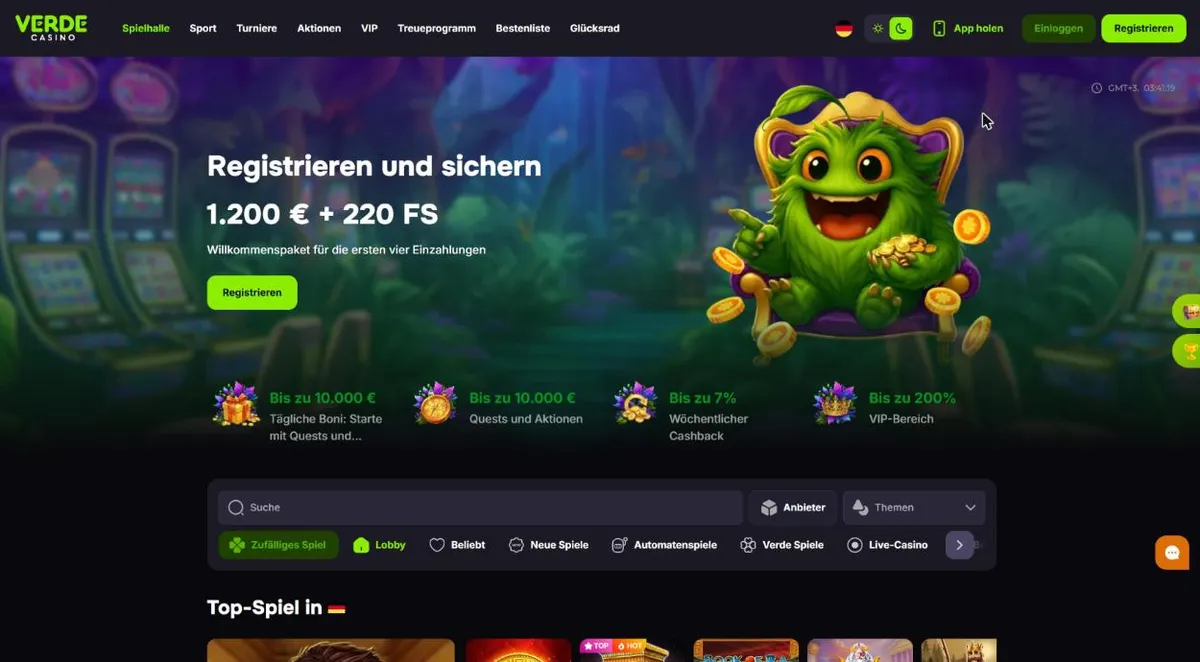
Slotsgem runs sports betting, live betting, a wheel of fortune and tournaments alongside its app, while Verde Casino offers sport and a welcome bonus of €1,200 plus 220 bonus spins over the first four deposits. The conditions for downloading are on the casinos' own pages. Download an app only from there, never from links in forums or chats.
The recommended casino runs in your phone browser, no file to download.
The cards compare four casinos. See which ones combine an app, an interface in your language and clear limits before you decide.

Lolajack
Bonus wagering x35, 10 daysMax. stake with bonus €100
4.5/5

Hit'n'Spin
Verification above USD 1,000Sports betting no
4.3/5

Slotsgem
Sports betting yes, including live bettingBonus package up to €1,450 + 225 bonus spins
4.3/5

Verde Casino
Welcome package €1,200 + 220 bonus spinsCashback up to 7% a week
4.2/5
Ordered by our rating.
Where to go next
How to sign in to an existing account is covered on Vavada login. The Vavada games and the Vavada live casino run in the web app just as in the browser. Alternatives are on Casinos like Vavada, and for the bonus, see Vavada bonus.
For the full picture, see our Vavada Casino guide.
Questions about Vavada
Is the Vavada app in Google Play or the App Store?
No. From the information we have read and the footer of vavada.com, only the web app exists. The footer links "App for iOS" and "App for Android" lead to installing that web app, not to a store.
Do I need an APK file on Android?
No. A PWA is installed straight from Chrome. An APK from a stranger's site can contain malicious code and harvest account details.
How do I install the Vavada app on an iPhone?
Open the site in Safari, tap Share and choose Add to Home Screen. Safari is the best browser for the job.
Can I install the Vavada app if the site shows error 451?
On 17 October 2026 vavada.com showed 451 to visitors from Poland and Germany, with only "Log in" for existing accounts left. A new account, and so a new installation, was not possible. Alternatives are on Casinos like Vavada.
Is the web app safer than an APK?
It runs in the browser under the real address, and you recognise it by the padlock in the address bar. An APK comes from whoever uploaded it and is hard to verify.
Does signing in work the same in the app as in the browser?
Yes, it is the same site. The form offers email or phone with a password, plus Telegram and Google. See Vavada login.